Overview
This document presents a comprehensive breakdown of roles and permissions within the AGENT platform. Roles ensure smooth collaboration, resource allocation, and data management.
Let's delve into the specifics of each role and their associated permissions.
Roles
The AGENT Platform has five user roles, each with specific permissions and goals. They are as follows:
| Role | Description |
|---|
| Platform Admin | As the platform's overseer, the Platform Admin holds the highest level of authority and governs all aspects of user roles and permissions. |
| Dataset Admin | The dataset admin is pivotal in data management and resource allocation. They are responsible for managing datasets and allocating Privacy Budgets for both datasets and teams. |
| Team Admin | Responsible for managing teams and Privacy Budgets for users, the Team Admin ensures smooth collaboration and resource utilisation within their designated teams. |
| User/Member | Users can create datasets and teams, utilise datasets, consume allocated Privacy Budgets, and contribute to projects and data analysis. |
When member users create a dataset or team, the corresponding role is assigned to them automatically. For example, if they create a dataset, they become the Dataset Admin for that particular dataset, holding its corresponding permissions.
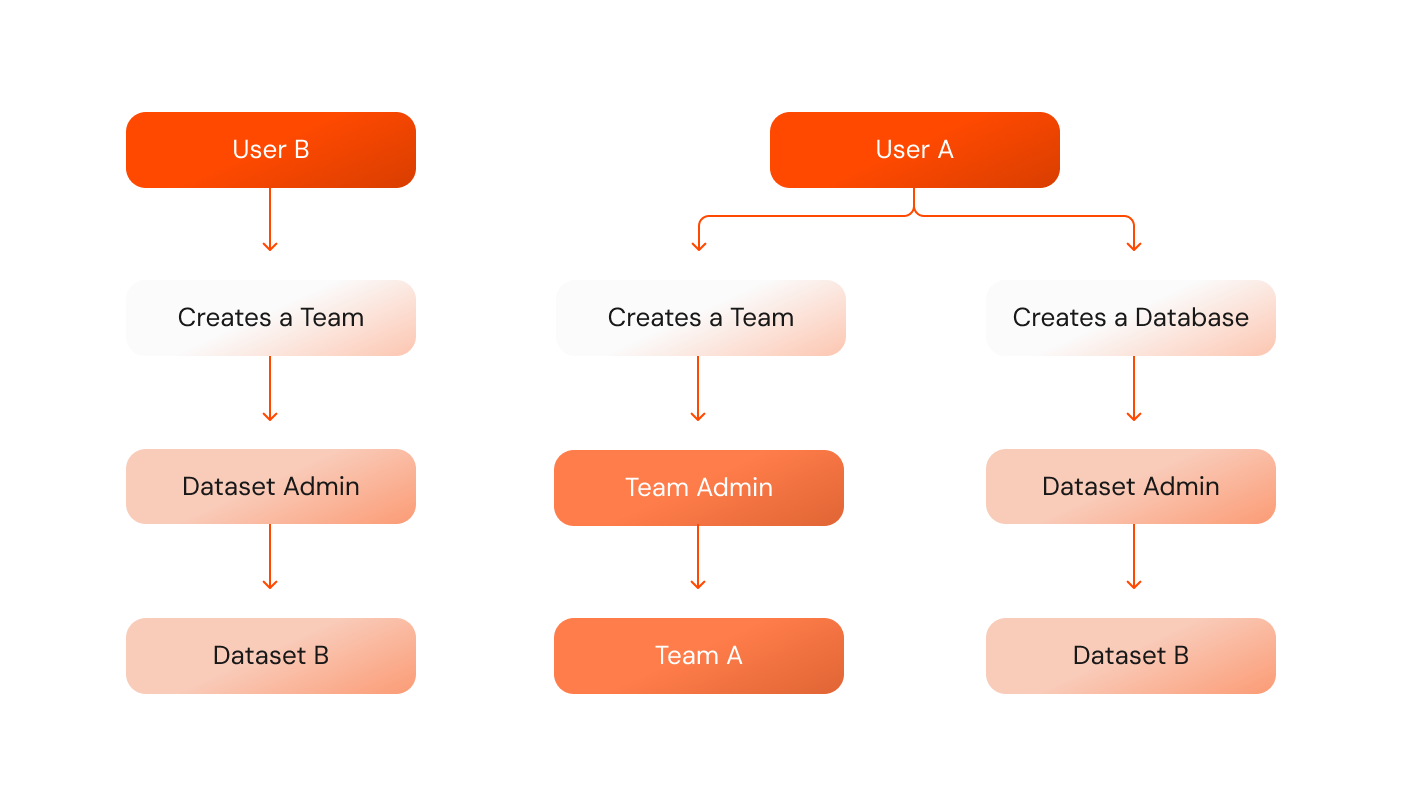
Roles are not mutually exclusive, meaning users can hold multiple roles simultaneously, with varying degrees of permission. See the following example diagram:
Where:
- User B created Dataset B, becoming its Dataset Admin.
- Dataset B is used by Team A for data analysis.
- User A created Team A, holding the Team Admin role for that particular team.
- However, User A also created Dataset A, which means it has the Dataset Admin role for that particular dataset.
The diagram illustrates how Users can hold multiple roles and manage teams and datasets simultaneously. They can also analyze other datasets and be members of different teams.
Permissions
The tables in the sections below describe the permissions available for each user role, which serve as a cornerstone for understanding the various user roles and their corresponding access levels. They are presented separately for each feature of the platform.
The symbols in the tables denote:
| Symbol | Meaning |
|---|
| Allowed |
| Not allowed |
| Allowed for a user within their own profile |
| Allowed within a team |
Datasets
When it comes to Datasets, the Dataset Admin is the central figure. The Dataset Admin holds permission to edit and manage datasets, answers Privacy Budget requests, and delegates Privacy Budgets to teams. Member users can create a dataset and receive the Dataset Admin Role.
The following table showcases the permissions for Datasets:
| Platform Admin | Dataset Admin | Team Admin | User member |
|---|
| Add a new dataset | | | | |
| Delete a dataset | | | | |
| Read a dataset | | | | |
| Read a public dataset | | | | |
| Update variable dataset information | | | | |
| View all of the sessions which accessed the data | | | | |
| Read the source of the dataset details | | | | |
| Update source of the dataset details | | | | |
| Read changes that were made to the dataset | | | | |
| Delegate Privacy Budget to teams and users | | | | |
| Read the Privacy Budget to teams and users | | | | |
| Update people's Privacy Budget | | | | |
| Remove the Privacy Budget delegated to people | | | | |
| Read the Privacy Budget requests coming in | | | | |
| Update (accept/reject) requests | | | | |
| Read dataset admins | | | | |
| Update dataset admins | | | | |
Teams
The Team Admins hold most permissions to manage teams. They can delete and edit teams, delegate the Privacy Budget to their team members, and more.
The following table showcases the permissions for Teams:
| Platform Admin | Dataset Admin | Team Admin | User member |
|---|
| Create a new team | | | | |
| Delete a team | | | | |
| Search for a team using name/slug | | | | |
| Read team details | | | | |
| Update team details | | | | |
| Read session Privacy Budget spends | | | | |
| Add a user to a team | | | | |
| See the users in a team | | | | |
| Remove a user from a team | | | | |
| Read datasets accessible to the team | | | | |
| Read the code executed by a user | | | | |
| Give a team new permissions | | | | |
| Read the permissions of a team | | | | |
| Remove a permission from a team | | | | |
| Assign Privacy Budgets to users in the team | | | | |
| Read the Privacy Budgets of users in the team | | | | |
| Update the Privacy Budgets for users in the team | | | | |
| Remove Privacy Budgets from users in the team | | | | |
| Create Privacy Budget request for the team | | | | |
| Read Privacy Budget requests made for the team | | | | |
| Cancel Privacy Budget requests for the team | | | | |
| Read budget requests made by users of the team for Privacy Budget via team | | | | |
| Approve/reject Privacy Budget requests from the users | | | | |
| Read the changes made on the team | | | | |
| Read the sessions made for the team | | | | |
Users
The Platform Admins can add and remove users from the platform. Members can also manage their accounts, edit their variable information, and read their account details.
The following table showcases the permissions for User:
| Platform Admin | Dataset Admin | Team Admin | User member |
|---|
| Add a new user | | | | |
| Delete a user | | | | |
| Search for a user (only name and email) | | | | |
| Read user details | | | | |
| Update variable user information | | | | |
| Create a password | | | | |
| Change password | | | | |
| Delete password (i.e. switch to SSO) (only if SSO exists) | | | | |
| Create SSO | | | | |
| Remove SSO | | | | |
| Read a users notification | | | | |
| Update a notification (mark as read/seen) | | | | |
| Read the teams a user is a member of | | | | |
| Read the sessions the user made | | | | |
| Read the changes the user did | | | | |
| Read the Privacy Budgets that the user has | | | | |
| Create a Privacy Budget request for a user | | | | |
| Read the Privacy Budget requests | | | | |
| Terminate a Privacy Budget requestT | | | | |
| See a 2fa request | | | | |
| Update it as accept/reject | | | | |
| Read user permissions | | | | |