Dataset Budget
The dataset has a lifetime Privacy Budget of 5 and the Dataset Admin allocated the whole Privacy Budget to two teams.
- Team A received a Privacy Budget of 2
- Team B received a Privacy Budget of 3.
As mentioned in the previous section, epsilon () and delta () are the base parameters that quantify and manage privacy protection in differential privacy. AGENT distributes its values to teams and data scientists through the Privacy Budget. All Datasets have a lifetime Privacy Budget, which is then allocated to Teams and data scientists. Each query they make spends Epsilon and Delta from the Privacy Budget. The amount of Epsilon and Delta spent on their analysis also determines the tradeoff between safeguarding the privacy of individual data points and preserving the dataset's utility for data scientists.
Administrators can ensure privacy effectively by creating a hierarchy and allocating Privacy Budget amounts, even when different teams and members use the same dataset.
AGENT maintains an in‑built differential‑privacy accountant that tracks the cumulative privacy loss over the lifetime of a project or team. Given a list of spends (one record per query to AGENT), the accountant chooses the tightest valid composition theorem and returns the total spent.
If every query provides ‑DP, simply add
This is the worst‑case bound but applies to all mechanisms.
Fix an extra slack parameter . For ‑DP queries you may use
When every , the second term above is often negligible.
rho=True)For mechanisms that satisfy zero‑Concentrated DP (zCDP) with parameters (e.g. Gaussian mechanism):
Convert back to with
If you only know for each query you can lift them to zCDP via
In the advanced–composition theorem we introduce an extra parameter δ′ > 0. It is not one of the per‑query δ’s; instead, it is a tunable slack variable that lets the accountant trade a little extra failure probability for a tighter bound on ε. AGENT uses the remaining delta in the budget for this slack variable. For example, if your total delta budget is () and you have already spent () on queries, then the remaining delta budget is (). This value will be used as the value of δ′ in the advanced composition theorem.
When a lot of is remaining the budget, you might see the total being very low since we get a tight bound on using the advanced composition theorem. This is because the slack variable δ′ is used to get a tighter bound on . When you start exhausting the delta budget, you will see the total epsilon increasing. This is because the slack variable δ′ reduces as you exhaust δ from your budget. When the delta budget is completely exhausted, the accountant uses a very small value as the value of δ′ and the same is added to your total spent. Hence, you might see that that total that you spent is slightly more than your budget when you exhaust your delta completely.
For low epsilon values, the accountant uses advanced composition. High values of epsilon (Usually (), unless set otherwise by admin) are handled with basic composition because advanced composition performs worse than basic. The accountant also uses the zCDP composition when gaussian noise mechanism is used in the query.
The Privacy Budget is handled hierarchically, and different users with different roles control its distribution. The process begins when a user creates a dataset, becomes the Dataset Admin, and defines the total Privacy Budget available. The Dataset Admin manages and delegates the Privacy Budget amount each team and member can use.
The diagram below presents an example of Privacy Budget distribution.
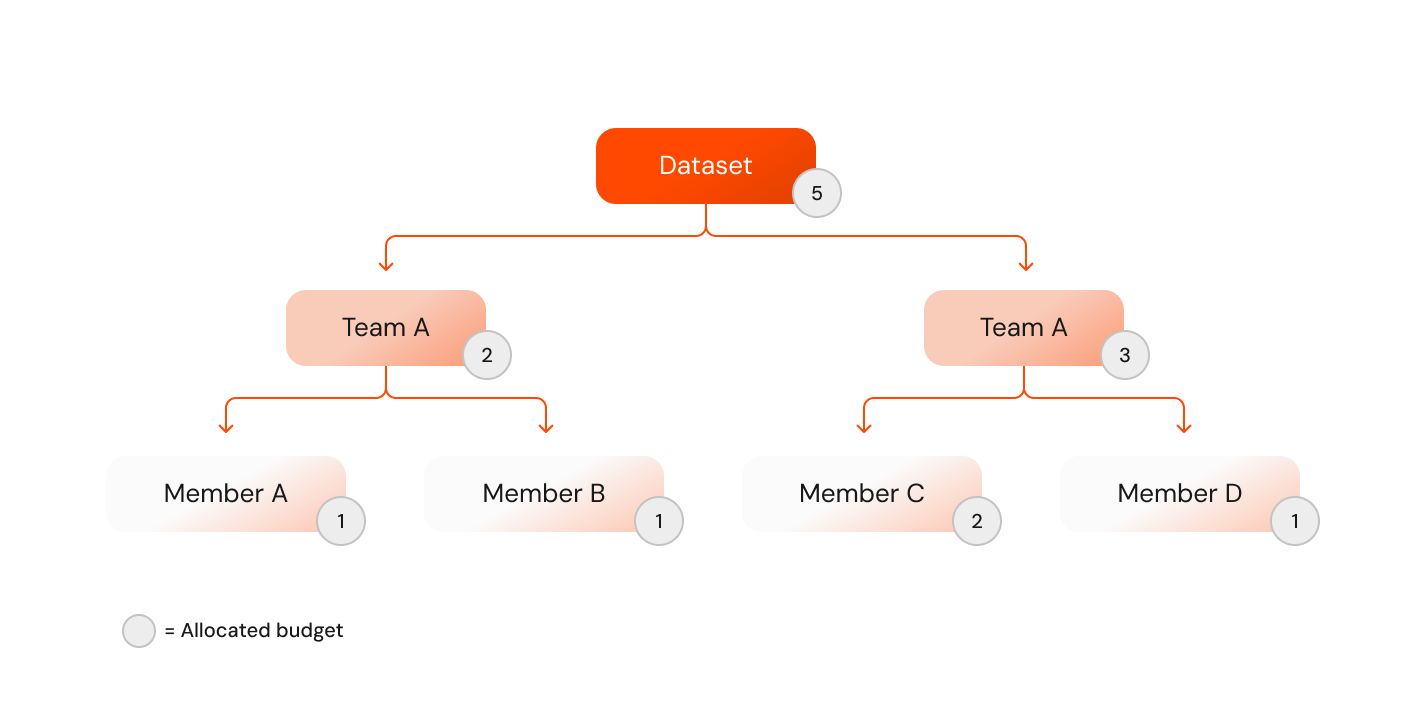
In the diagram, we can observe the following:
Dataset Budget
The dataset has a lifetime Privacy Budget of 5 and the Dataset Admin allocated the whole Privacy Budget to two teams.
Team Privacy Budget
Each team has two Members.
Member Privacy Budget
Each Member can now spend the allocated as needed. At any moment, the Member can request an additional Privacy Budget from its Team Admin.
In this example, both the Dataset and Team Admins allocated their whole Privacy Budget, but they can also allocate it partially, leaving available Privacy Budget that can be allocated later.
When spending the Privacy Budget to allocate Epsilon () and Delta () to teams and members, consider the following:
It is essential to understand how Epsilon and Delta affect the utility or accuracy of the data analysis.
The nature of the data and its intended use are crucial in determining and . Highly sensitive data like health records may require a smaller for stronger privacy.
Determine the acceptable level of privacy risk. In scenarios where individual privacy is critical, opting for a smaller is advisable.
Consider the required accuracy and specificity of the data analysis results. For broader, less granular insights, a smaller ε may suffice.
Selecting suitable Epsilon () and delta () values is a critical decision that impacts the balance between data utility and privacy. Depending on the scenario, consider the following factors:
Highly sensitive data needs lower values to ensure data is more strictly protected.
Larger datasets typically will have better signal-to-noise ratios, mitigating the effect of the noise on the insights created.
Frequent access to data for analysis might require more restrictive settings to maintain privacy over time, especially if data is reused in a new analysis, and thus the Privacy Budgets can compound.
When multiple parties are involved, consider the cumulative privacy risk and adjust and accordingly.
Often, similar questions are asked, which can be used to answer one another, such as taking the sum, count, and later the mean. The net privacy loss can be minimised by caching and reusing the queries and responses across multiple queries.
When setting a lifetime Privacy Budget for a dataset it is advised to choose not greater than the inverse of the dataset size e.g. for a dataset with million records, a delta value of .